
 组件连接复用
- 全局共享节点池(NodePool):在
node_pool.json中集中定义连接节点,引擎内所有规则链都能通过ref://{资源ID}引用。 - 同链连接复用:直接在规则链
metadata里定义连接节点,链内其他节点通过ref://{源节点ID}复用,无需node_pool.json。
ref:// 的解析顺序统一为:同链优先(当前规则链 metadata 内定义的 endpoint / 连接节点)→ 全局 NodePool 回退。
按复用方向又分两种:
- 出站连接复用:节点共享一条到远端的拨号连接(MQTT / 数据库 / PLC 等)。
- 入站会话寻址:节点复用服务端 endpoint 已建立的设备连接,向指定设备反向推送(见文末会话寻址推送)。
# 全局共享节点池(NodePool)
endpoint 和 node 组件都支持共享资源节点,通过共享资源节点复用连接。共享组件必须实现 SharedNode 接口,官方提供的网络连接类组件基本都支持这种方式。
复用同一连接资源的步骤:
- 初始化共享资源节点。提供一个规则链文件进行初始化,其中定义的
endpoint和node客户端都会注册到全局共享节点池,供其他组件复用:
node_pool.DefaultNodePool.Load(dsl []byte)
全局共享节点池规则链文件示例:
{
  "ruleChain": {
    "id": "default_node_pool",
    "name": "全局共享节点池"
  },
  "metadata": {
    "endpoints": [
      {
        "id": "local_endpoint_nats",
        "type": "endpoint/nats",
        "name": "本地nats连接池",
        "configuration": {
          "server": "nats://127.0.0.1:4222"
        }
      },
      {
        "id": "local_kafka",
        "type": "endpoint/kafka",
        "name": "本地kafka连接池",
        "configuration": {
          "server": "127.0.0.1:9092"
        }
      }
    ],
    "nodes": [
      {
        "id": "local_mqtt_client",
        "type": "mqttClient",
        "name": "本地MQTT连接池",
        "configuration": {
          "server": "127.0.0.1:1883"
        }
      },
      {
        "id": "local_mysql_client",
        "type": "dbClient",
        "name": "本地MYSQL-test数据库连接池",
        "configuration": {
          "driverName": "mysql",
          "dsn": "root:root@tcp(127.0.0.1:3306)/test"
        }
      },
      {
        "id": "local_nats",
        "type": "x/natsClient",
        "name": "本地nats连接池",
        "configuration": {
          "server": "nats://127.0.0.1:4222"
        }
      },
      {
        "id": "local_rabbitmq",
        "type": "x/rabbitmqClient",
        "name": "本地rabbitmq连接池",
        "configuration": {
          "autoDelete": true,
          "durable": true,
          "exchange": "rulego",
          "exchangeType": "topic",
          "server": "amqp://guest:guest@127.0.0.1:5672/"
        }
      },
      {
        "id": "local_redis",
        "type": "x/redisClient",
        "name": "本地redis连接池",
        "configuration": {
          "db": 0,
          "server": "127.0.0.1:6379"
        }
      },
      {
        "id": "local_opengemini_write",
        "type": "x/opengeminiWrite",
        "name": "本地opengemini_write连接池",
        "configuration": {
          "database": "db0",
          "server": "127.0.0.1:8086"
        }
      },
      {
        "id": "local_opengemini_query",
        "type": "x/opengeminiQuery",
        "name": "本地opengemini_query连接池",
        "configuration": {
          "database": "db0",
          "server": "127.0.0.1:8086"
        }
      }
    ]
  }
}
2
3
4
5
6
7
8
9
10
11
12
13
14
15
16
17
18
19
20
21
22
23
24
25
26
27
28
29
30
31
32
33
34
35
36
37
38
39
40
41
42
43
44
45
46
47
48
49
50
51
52
53
54
55
56
57
58
59
60
61
62
63
64
65
66
67
68
69
70
71
72
73
74
75
76
77
78
79
80
81
82
83
84
85
86
87
88
89
90
91
92
node_pool.DefaultNodePool其他加载方法:参考 node_pool.go (opens new window)
- 其他组件通过
ref://{资源ID}引用共享连接客户端:
{
  "id": "node_2",
  "type": "mqttClient",
  "name": "测试",
  "configuration": {
    "maxReconnectInterval": 60,
    "qos": 0,
    "server": "ref://local_mqtt_client",
    "topic": "/device/msg"
  }
}
2
3
4
5
6
7
8
9
10
11
Kafka 连接共享
endpoint/kafka 与 x/kafkaProducer 共享同一连接单元(rulego-components):保存为共享节点的 kafka 连接(如上面的 local_kafka),多条规则链的 kafka 端点与发布节点都可以 "server": "ref://local_kafka" 复用,共用同一生产者连接与同一套连接信息(brokers、SASL/TLS)。受 sarama 客户端约束(一个 client 不允许被多个 consumer group 共享),每个端点的消费组仍按上述共享连接信息独立建连,groupId 等消费侧配置保持各端点独立。
代码方式注册(非 DSL)
v0.37.3+共享节点也可以直接在代码里注册,无需 `node_pool.json`:mqttEp, _ := endpoint.Registry.New("endpoint/mqtt", config, types.Configuration{
"server": "127.0.0.1:1883",
})
// 池主键取节点自身 Id(endpoint 组件为 server 地址):ref://127.0.0.1:1883
node_pool.DefaultNodePool.AddNode(mqttEp)
// 追加稳定别名:连接地址变化不影响 ref://gateway_mqtt 引用
node_pool.DefaultNodePool.AddNodeWithAlias("gateway_mqtt", mqttEp)
2
3
4
5
6
7
8
别名只是附加查找键:不改变节点主键,也不写入 DSL;ref://gateway_mqtt 与 ref://127.0.0.1:1883 解析到同一实例。已注册节点可用 AddAlias(id, aliases...) 继续追加别名,Del 按主键或别名删除时别名一并清理。
# 同链连接复用
v0.37.0+连接型组件支持**同链连接复用**:直接在规则链 `metadata` 里定义连接节点,链内其他节点通过 `ref://{源节点ID}` 复用其连接,无需配置全局 `node_pool.json`。适合连接只在某条链内被多个节点共用的场景。所有权模型:
- 本地模式(owner,连接拥有者):
server填实际地址的节点是连接的唯一拥有者,负责创建与关闭,并把连接按自身节点ID注册到当前链的同链资源目录。 - 引用模式(borrower,借用者):
server=ref://{源节点ID}的节点只借用连接,不持有所有权、零引用计数;owner 卸载时连接自动从目录注销,借用方下次取用若已无源则报错。
支持的组件(嵌入 base.SharedNode[T] 且已接入同链注册):
- 核心:
dbClient、mqttClient、net、ws - IoT(rulego-components-iot):
x/modbus与点位表节点x/modbusRead/x/modbusWrite;PLC/仪表读写x/s7Read/x/s7Write、x/eipRead/x/eipWrite、x/mcRead/x/mcWrite、x/finsRead/x/finsWrite、x/iec104Read/x/iec104Write、x/dlt645Read/x/dlt645Write、x/bacnetRead/x/bacnetWrite、x/snmpRead/x/snmpWrite、x/opcuaRead/x/opcuaWrite;串口x/serialIn/x/serialOut/x/serialRequest/x/serialControl;时序库写入x/influxdbWrite、x/opengeminiWrite、x/promremoteWrite、x/tdengineWrite、x/timescaledbWrite;以及endpoint/opcua
Read/Write 跨组件复用
同一协议的读/写组件共享相同的连接类型 T(例如 EIP 读/写均为 *gologix.Client,S7 均为 *gos7.TCPClientHandler),因此读节点可以 ref:// 一个写节点,共用一条到设备的连接——一条连接既读又写,无需各建一条。net/ws 既支持出站连接复用(ref:// 另一个 net/ws 节点共享拨号连接),也支持入站会话寻址(ref:// endpoint,见下文)。endpoint/opcua 与 x/opcuaRead/x/opcuaWrite 同为 *opcua.Client,订阅端点的连接也能被读写节点 ref:// 复用——订阅、采集、下发共用一条 OPC UA 连接。
示例 1:两个 MQTT 节点共享一条连接
{
  "ruleChain": { "id": "r1", "name": "同链复用示例" },
  "metadata": {
    "nodes": [
      {
        "id": "mqtt_owner",
        "type": "mqttClient",
        "name": "MQTT连接owner",
        "configuration": { "server": "127.0.0.1:1883" }
      },
      {
        "id": "mqtt_pub",
        "type": "mqttClient",
        "name": "复用连接发布",
        "configuration": { "server": "ref://mqtt_owner", "topic": "/device/msg" }
      }
    ]
  }
}
2
3
4
5
6
7
8
9
10
11
12
13
14
15
16
17
18
19
mqtt_pub 复用 mqtt_owner 建立的 MQTT 连接,两个节点共享同一条拨号连接,各自的 topic 等非连接类配置保持独立。
示例 2:S7 读 / 写共用一条 PLC 连接
{
  "ruleChain": { "id": "r2", "name": "S7读写共享连接" },
  "metadata": {
    "nodes": [
      {
        "id": "s7_write",
        "type": "x/s7Write",
        "configuration": { "server": "192.168.1.100:102" }
      },
      {
        "id": "s7_read",
        "type": "x/s7Read",
        "configuration": { "server": "ref://s7_write" }
      }
    ]
  }
}
2
3
4
5
6
7
8
9
10
11
12
13
14
15
16
17
s7_read 复用 s7_write 建立的 S7 连接,读、写两个节点共享一条到 PLC 的 TCP 连接。EIP / SNMP / OPC UA 的读 / 写用法相同。
# ref:// 解析顺序
无论复用的是出站连接还是入站会话,ref://{ID} 都按以下顺序解析:
- 同链资源目录优先:先在当前规则链的
metadata(endpoints+nodes)中查找 ID 匹配的资源。 - 全局 NodePool 回退:同链未命中时,再到
node_pool.json定义的全局共享节点池中查找。
因此连接节点既可以定义在规则链内(同链复用),也可以集中放在 node_pool.json(全局复用),ref:// 都能正确解析。endpoint 同理:定义在链内的 endpoint/net / endpoint/ws 也能被同链的 net / ws 节点 ref:// 引用寻址,无需放入 node_pool.json。
# rulego-server 配置共享节点
config.conf配置文件配置node_pool_file示例:
# 其他配置
# ...
# Node pool file
node_pool_file=./node_pool.json
# 其他配置
# ...
2
3
4
5
6
node_pool.json文件示例:
{
  "ruleChain": {
    "id": "default_node_pool",
    "name": "全局共享节点池"
  },
  "metadata": {
    "endpoints": [
      {
        "id": "local_endpoint_nats",
        "type": "endpoint/nats",
        "name": "本地nats连接池",
        "configuration": {
          "server": "nats://127.0.0.1:4222"
        }
      },
      {
        "id": "local_kafka",
        "type": "endpoint/kafka",
        "name": "本地kafka连接池",
        "configuration": {
          "server": "127.0.0.1:9092"
        }
      }
    ],
    "nodes": [
      {
        "id": "local_mqtt_client",
        "type": "mqttClient",
        "name": "本地MQTT连接池",
        "configuration": {
          "server": "127.0.0.1:1883"
        }
      },
      {
        "id": "local_mysql_client",
        "type": "dbClient",
        "name": "本地MYSQL-test数据库连接池",
        "configuration": {
          "driverName": "mysql",
          "dsn": "root:root@tcp(127.0.0.1:3306)/test"
        }
      }
    ]
  }
}
2
3
4
5
6
7
8
9
10
11
12
13
14
15
16
17
18
19
20
21
22
23
24
25
26
27
28
29
30
31
32
33
34
35
36
37
38
39
40
41
42
43
44
45
- 启动 rulego-server 指定配置文件:
nohup ./server -c="./config.conf" >> console.log &
- 完成后,在 RuleGo-Editor 可视化节点的配置中,可以通过下拉选择共享节点:
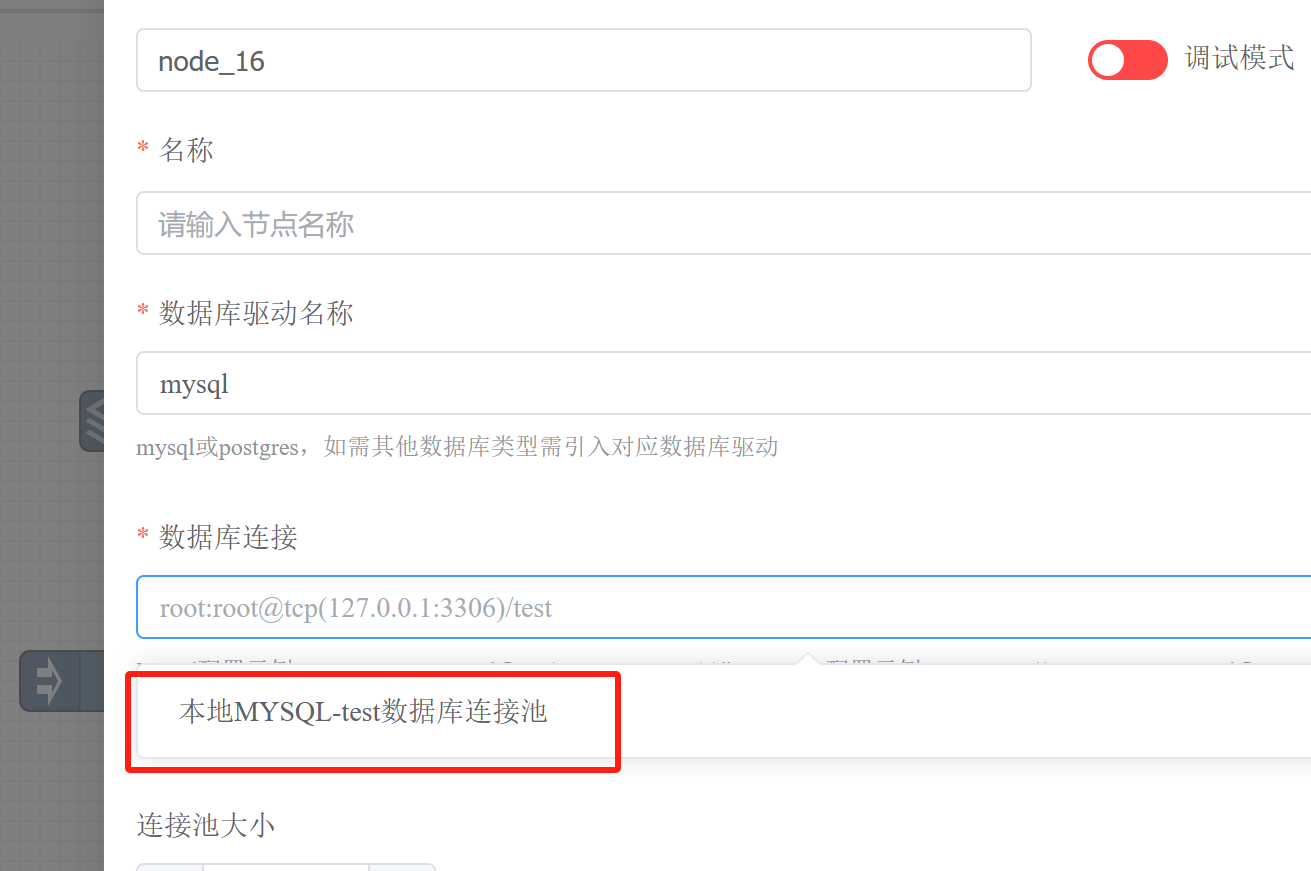
在编辑器中,连接类字段的「共享连接」下拉会自动列出同链内可复用的节点:默认包含同类型节点(如多个
mqttClient互相可选),组件声明refNodes后还可列出跨类型节点(如 S7 读节点下拉里能选 S7 写节点)、以及同链 endpoint(net/ws选endpoint/net/endpoint/ws)。组件声明poolRefNodes后,下拉还会列出全局节点池中其他类型组件的共享条目(如 kafka 端点与x/kafkaProducer发布者共用同一个 kafka 连接)。
# 自定义共享资源节点组件
框架对共享节点做了封装,只需嵌入 base.SharedNode[T] 并在 Init 中调用两个方法,就能把一个自定义组件变成可被同链 / 全局复用的连接资源节点。
下面是一个完整的自定义共享 TCP 客户端组件示例(封装一条到固定后端的持久连接作为可复用资源 T,仅依赖标准库):同一规则链内多个 x/tcpClient 节点可复用同一条 TCP 连接。
1. 定义资源类型、配置与组件(配置字段使用 json tag、小驼峰):
package mycomponents

import (
	"net"

	"github.com/rulego/rulego"
	"github.com/rulego/rulego/api/types"
	"github.com/rulego/rulego/components/base"
	"github.com/rulego/rulego/util/maps"
)

// tcpConn 对到固定 TCP 后端的持久连接的封装(可复用资源 T)
type tcpConn struct {
	conn net.Conn
}

// TcpClientConfiguration 节点配置
type TcpClientConfiguration struct {
	// Server owner 填建连目标 host:port(如 127.0.0.1:9000);
	//        borrower 填 ref://<owner 节点ID>
	Server string `json:"server"`
}

// TcpClientNode 复用一条到固定 TCP 后端的连接
type TcpClientNode struct {
	base.SharedNode[*tcpConn]
	//节点配置
	Config TcpClientConfiguration
}

func (x *TcpClientNode) New() types.Node {
	return &TcpClientNode{}
}

func (x *TcpClientNode) Type() string {
	return "x/tcpClient"
}
2
3
4
5
6
7
8
9
10
11
12
13
14
15
16
17
18
19
20
21
22
23
24
25
26
27
28
29
30
31
32
33
34
35
36
37
2. Init 注册连接工厂并启用同链复用:
// Init 初始化
func (x *TcpClientNode) Init(ruleConfig types.Config, configuration types.Configuration) error {
	if err := maps.Map2Struct(configuration, &x.Config); err != nil {
		return err
	}
	// InitWithClose:注册连接工厂 + 关闭函数(owner 卸载时回调关闭)
	_ = x.SharedNode.InitWithClose(ruleConfig, x.Type(), x.Config.Server, ruleConfig.NodeClientInitNow,
		func() (*tcpConn, error) {
			// owner 实际建连:仅 owner 执行此工厂;borrower 走借用分支不进入这里
			c, err := net.Dial("tcp", x.Config.Server)
			if err != nil {
				return nil, err
			}
			return &tcpConn{conn: c}, nil
		},
		func(t *tcpConn) error {
			if t != nil {
				return t.conn.Close()
			}
			return nil
		})
	// BindChain:把本地连接按节点ID注册到当前链的同链资源目录,供链内 ref:// 借用
	x.SharedNode.BindChain(configuration)
	return nil
}
2
3
4
5
6
7
8
9
10
11
12
13
14
15
16
17
18
19
20
21
22
23
24
25
3. OnMsg 取用连接——owner 与 borrower 走同一段代码,框架根据 server 是真实地址还是 ref:// 自动决定「创建并注册」还是「向同链 / NodePool 借用」:
// OnMsg 处理消息
func (x *TcpClientNode) OnMsg(ctx types.RuleContext, msg types.RuleMsg) {
	// GetSafely:owner 创建/复用自身连接;borrower 借用同链或 NodePool 连接
	c, err := x.SharedNode.GetSafely()
	if err != nil {
		ctx.TellFailure(msg, err)
		return
	}
	// 把消息负荷写入共享连接(见下方并发注意事项)
	if _, err := c.conn.Write([]byte(msg.Data)); err != nil {
		ctx.TellFailure(msg, err)
		return
	}
	ctx.TellSuccess(msg)
}

func (x *TcpClientNode) Destroy() {}
2
3
4
5
6
7
8
9
10
11
12
13
14
15
16
17
4. 注册组件(详见自定义组件概述):
func init() {
	_ = rulego.Registry.Register(&TcpClientNode{})
}
2
3
5. 在规则链中使用——一个 owner 建连,另一个 borrower 复用:
{
  "ruleChain": { "id": "r1", "name": "自定义共享组件示例" },
  "metadata": {
    "nodes": [
      {
        "id": "tcp_owner",
        "type": "x/tcpClient",
        "configuration": { "server": "127.0.0.1:9000" }
      },
      {
        "id": "tcp_send",
        "type": "x/tcpClient",
        "configuration": { "server": "ref://tcp_owner" }
      }
    ]
  }
}
2
3
4
5
6
7
8
9
10
11
12
13
14
15
16
17
接入要点
- 用
InitWithClose(而非旧版Init)注册连接工厂与关闭函数,保证 owner 卸载时连接被正确释放;OnMsg中用GetSafely()取用连接(同链优先解析,不要用旧的Get())。 BindChain(configuration)是启用同链连接复用的必要步骤:不调用则该组件只能被全局 NodePool 复用,无法在同链内被ref://。InitWithClose与BindChain两个方法缺一不可。- 自带重连逻辑的组件,重连成功后必须调用
x.SharedNode.Refresh(newClient):同链借用方经资源目录取连接,只有 Refresh 更新目录条目后,借用方才能拿到重连后的新连接,否则会一直取到已失效的旧连接。 T必须是连接类型本身(如示例的*tcpConn、或*mqtt.Client),同类型组件间才能互相ref://借用(不同T类型断言不匹配,会报错)。- 共享单条连接时,连接上非并发安全的操作(如本例的
conn.Write)需由组件自行加锁串行化,或直接选用本身并发安全的客户端。
# 会话寻址推送:复用服务端设备连接
前面介绍的是复用出站客户端连接(如多个 MQTT 节点共享一条拨号连接)。ref:// 还支持另一种复用:复用服务端 endpoint 已建立的入站设备连接,实现按设备主动推送。
适用组件:endpoint/net(TCP/UDP)、endpoint/ws(WebSocket)。这些 endpoint 内置会话注册表,设备连入后注册会话;net / ws 节点配置 server=ref://<endpoint 实例ID> 即可复用这些会话,按 target(sessionKey 提取的标识,如设备ID;* 广播)精确寻址向特定设备主动下发数据。
与客户端连接复用的区别:
- 客户端复用:节点共享一条出站连接(节点 → 远端服务器)
- 会话寻址:节点复用 endpoint 的入站连接池(设备 → endpoint),向已连接设备反向推送
工作流程:
- 设备连入
endpoint/net/endpoint/ws,按sessionKey(如${msg.deviceId})从首帧提取身份并注册会话 net/ws节点配置server=ref://<endpoint 实例ID>、target=设备ID或*- 节点按 ref:// 解析顺序 找到同链(或 NodePool)的 endpoint,从其会话池查找目标设备连接并复用推送