
 Component Connection Reuse
- Global shared node pool (NodePool): connection nodes are defined centrally in
node_pool.jsonand can be referenced by all rule chains in the engine viaref://{resourceId}. - Chain-scoped connection reuse: connection nodes are defined directly in a rule chain's
metadataand reused by other nodes in the same chain viaref://{sourceNodeId}, with nonode_pool.jsonrequired.
The ref:// resolution order is unified: same-chain first (endpoints / connection nodes defined in the current rule chain's metadata) → global NodePool fallback.
By reuse direction there are also two kinds:
- Outbound connection reuse: nodes share one dialed connection to a remote (MQTT / database / PLC, etc.).
- Inbound session addressing: nodes reuse the inbound device connections already established by a server-side endpoint to push back to specific devices (see Session Addressing Push at the end).
# Global Shared Node Pool (NodePool)
Both endpoint and node components support shared resource nodes, through which connections are reused. Shared components must implement the SharedNode interface. Officially provided network connection components basically all support this.
Steps to reuse the same connection resource:
- Initialize the shared resource node. Provide a rule chain file for initialization; the
endpointandnodeclients defined in it are registered to the global shared node pool and reused by other components:
node_pool.DefaultNodePool.Load(dsl []byte)
Example of a global shared node pool rule chain file:
{
  "ruleChain": {
    "id": "default_node_pool",
    "name": "Global Shared Node Pool"
  },
  "metadata": {
    "endpoints": [
      {
        "id": "local_endpoint_nats",
        "type": "endpoint/nats",
        "name": "Local NATS Connection Pool",
        "configuration": {
          "server": "nats://127.0.0.1:4222"
        }
      }
    ],
    "nodes": [
      {
        "id": "local_mqtt_client",
        "type": "mqttClient",
        "name": "Local MQTT Connection Pool",
        "configuration": {
          "server": "127.0.0.1:1883"
        }
      },
      {
        "id": "local_mysql_client",
        "type": "dbClient",
        "name": "Local MYSQL-test Database Connection Pool",
        "configuration": {
          "driverName": "mysql",
          "dsn": "root:root@tcp(127.0.0.1:3306)/test"
        }
      },
      {
        "id": "local_nats",
        "type": "x/natsClient",
        "name": "Local NATS Connection Pool",
        "configuration": {
          "server": "nats://127.0.0.1:4222"
        }
      },
      {
        "id": "local_rabbitmq",
        "type": "x/rabbitmqClient",
        "name": "Local RabbitMQ Connection Pool",
        "configuration": {
          "autoDelete": true,
          "durable": true,
          "exchange": "rulego",
          "exchangeType": "topic",
          "server": "amqp://guest:guest@127.0.0.1:5672/"
        }
      },
      {
        "id": "local_redis",
        "type": "x/redisClient",
        "name": "Local Redis Connection Pool",
        "configuration": {
          "db": 0,
          "server": "127.0.0.1:6379"
        }
      },
      {
        "id": "local_opengemini_write",
        "type": "x/opengeminiWrite",
        "name": "Local opengemini_write Connection Pool",
        "configuration": {
          "database": "db0",
          "server": "127.0.0.1:8086"
        }
      },
      {
        "id": "local_opengemini_query",
        "type": "x/opengeminiQuery",
        "name": "Local opengemini_query Connection Pool",
        "configuration": {
          "database": "db0",
          "server": "127.0.0.1:8086"
        }
      }
    ]
  }
}
2
3
4
5
6
7
8
9
10
11
12
13
14
15
16
17
18
19
20
21
22
23
24
25
26
27
28
29
30
31
32
33
34
35
36
37
38
39
40
41
42
43
44
45
46
47
48
49
50
51
52
53
54
55
56
57
58
59
60
61
62
63
64
65
66
67
68
69
70
71
72
73
74
75
76
77
78
79
80
81
82
83
84
Other loading methods for
node_pool.DefaultNodePool: refer to node_pool.go (opens new window)
- Other components reference the shared connection client via
ref://{resourceId}:
{
  "id": "node_2",
  "type": "mqttClient",
  "name": "Test",
  "configuration": {
    "maxReconnectInterval": 60,
    "qos": 0,
    "server": "ref://local_mqtt_client",
    "topic": "/device/msg"
  }
}
2
3
4
5
6
7
8
9
10
11
Programmatic Registration (non-DSL)
v0.37.3+Shared nodes can also be registered directly in code, without `node_pool.json`:mqttEp, _ := endpoint.Registry.New("endpoint/mqtt", config, types.Configuration{
"server": "127.0.0.1:1883",
})
// The pool key is the node's own Id (the server address for endpoint components): ref://127.0.0.1:1883
node_pool.DefaultNodePool.AddNode(mqttEp)
// Bind a stable alias: ref://gateway_mqtt keeps working even if the address changes
node_pool.DefaultNodePool.AddNodeWithAlias("gateway_mqtt", mqttEp)
2
3
4
5
6
7
8
The alias is only an extra lookup key: it never changes the node's primary key and is not written into DSL; ref://gateway_mqtt and ref://127.0.0.1:1883 resolve to the same instance. Use AddAlias(id, aliases...) to bind more aliases to a registered node; Del removes the node by primary id or alias and cleans up its aliases.
# Chain-Scoped Connection Reuse
v0.37.0+Connection-holding components support **chain-scoped connection reuse**: define connection nodes directly in a rule chain's `metadata`, and other nodes in the same chain reuse their connections via `ref://{sourceNodeId}`, with no need for a global `node_pool.json`. This fits scenarios where a connection is shared only by several nodes within one chain.Ownership model:
- Local mode (owner, the connection owner): the node whose
serveris a real address is the sole owner of the connection. It creates and closes the connection, and registers it under its own node ID in the current chain's same-chain resource registry. - Reference mode (borrower): the node with
server=ref://{sourceNodeId}only borrows the connection. It holds no ownership and uses zero reference counting; when the owner is destroyed the connection is automatically unregistered from the registry, and a borrower's next fetch fails if the source is gone.
Supported components (embed base.SharedNode[T] and have chain-scoped registration enabled):
- Core:
dbClient,mqttClient,net,ws - IoT (rulego-components-iot):
x/modbusand the point-table nodesx/modbusRead/x/modbusWrite; PLC/meter read-writex/s7Read/x/s7Write,x/eipRead/x/eipWrite,x/mcRead/x/mcWrite,x/finsRead/x/finsWrite,x/iec104Read/x/iec104Write,x/dlt645Read/x/dlt645Write,x/bacnetRead/x/bacnetWrite,x/snmpRead/x/snmpWrite,x/opcuaRead/x/opcuaWrite; serialx/serialIn/x/serialOut/x/serialRequest/x/serialControl; TSDB writersx/influxdbWrite,x/opengeminiWrite,x/promremoteWrite,x/tdengineWrite,x/timescaledbWrite; plusendpoint/opcua
Read/Write cross-component reuse
Read and Write components of the same protocol share the same connection type T (e.g. both EIP Read and Write use *gologix.Client; both S7 use *gos7.TCPClientHandler), so a Read node can ref:// a Write node to share one connection to the device — a single connection serves both reads and writes, no need to open two. net/ws support both outbound connection reuse (ref:// another net/ws node to share a dialed connection) and inbound session addressing (ref:// an endpoint, see below). endpoint/opcua and x/opcuaRead/x/opcuaWrite share the same *opcua.Client type, so the subscribing endpoint's connection can also be ref://-reused by the read/write nodes — subscription, collection and commands share one OPC UA connection.
Example 1: two MQTT nodes share one connection
{
  "ruleChain": { "id": "r1", "name": "Chain-scoped reuse example" },
  "metadata": {
    "nodes": [
      {
        "id": "mqtt_owner",
        "type": "mqttClient",
        "name": "MQTT connection owner",
        "configuration": { "server": "127.0.0.1:1883" }
      },
      {
        "id": "mqtt_pub",
        "type": "mqttClient",
        "name": "Reuse connection to publish",
        "configuration": { "server": "ref://mqtt_owner", "topic": "/device/msg" }
      }
    ]
  }
}
2
3
4
5
6
7
8
9
10
11
12
13
14
15
16
17
18
19
mqtt_pub reuses the MQTT connection established by mqtt_owner; the two nodes share one dialed connection while keeping their own non-connection config (such as topic) independent.
Example 2: S7 Read / Write share one PLC connection
{
  "ruleChain": { "id": "r2", "name": "S7 read/write shared connection" },
  "metadata": {
    "nodes": [
      {
        "id": "s7_write",
        "type": "x/s7Write",
        "configuration": { "server": "192.168.1.100:102" }
      },
      {
        "id": "s7_read",
        "type": "x/s7Read",
        "configuration": { "server": "ref://s7_write" }
      }
    ]
  }
}
2
3
4
5
6
7
8
9
10
11
12
13
14
15
16
17
s7_read reuses the S7 connection established by s7_write; the read and write nodes share one TCP connection to the PLC. EIP / SNMP / OPC UA read / write work the same way.
# ref:// Resolution Order
Whether you are reusing an outbound connection or an inbound session, ref://{ID} is resolved in the following order:
- Same-chain resource registry first: look up a resource with a matching ID in the current rule chain's
metadata(endpoints+nodes). - Global NodePool fallback: if not found in-chain, fall back to the global shared node pool defined in
node_pool.json.
So a connection node can be defined either inside a rule chain (chain-scoped reuse) or centrally in node_pool.json (global reuse), and ref:// resolves it correctly either way. The same applies to endpoints: an endpoint/net / endpoint/ws defined in the chain can also be referenced by a same-chain net / ws node via ref:// for addressing, without being placed in node_pool.json.
# rulego-server Configuration for Shared Nodes
# 1. config.conf Configuration File Example
# Other Configurations
# ...
# Node pool file
node_pool_file=./node_pool.json
# Other Configurations
# ...
2
3
4
5
6
# 2. node_pool.json File Example
{
  "ruleChain": {
    "id": "default_node_pool",
    "name": "Global Shared Node Pool"
  },
  "metadata": {
    "endpoints": [
      {
        "id": "local_endpoint_nats",
        "type": "endpoint/nats",
        "name": "Local NATS Connection Pool",
        "configuration": {
          "server": "nats://127.0.0.1:4222"
        }
      }
    ],
    "nodes": [
      {
        "id": "local_mqtt_client",
        "type": "mqttClient",
        "name": "Local MQTT Connection Pool",
        "configuration": {
          "server": "127.0.0.1:1883"
        }
      },
      {
        "id": "local_mysql_client",
        "type": "dbClient",
        "name": "Local MYSQL-test Database Connection Pool",
        "configuration": {
          "driverName": "mysql",
          "dsn": "root:root@tcp(127.0.0.1:3306)/test"
        }
      }
    ]
  }
}
2
3
4
5
6
7
8
9
10
11
12
13
14
15
16
17
18
19
20
21
22
23
24
25
26
27
28
29
30
31
32
33
34
35
36
37
# 3. Starting rulego-server with the Configuration File
nohup ./server -c="./config.conf" >> console.log &
# 4. After Completion, in the RuleGo-Editor Visual Node Configuration, Shared Nodes Can Be Selected from a Dropdown Menu
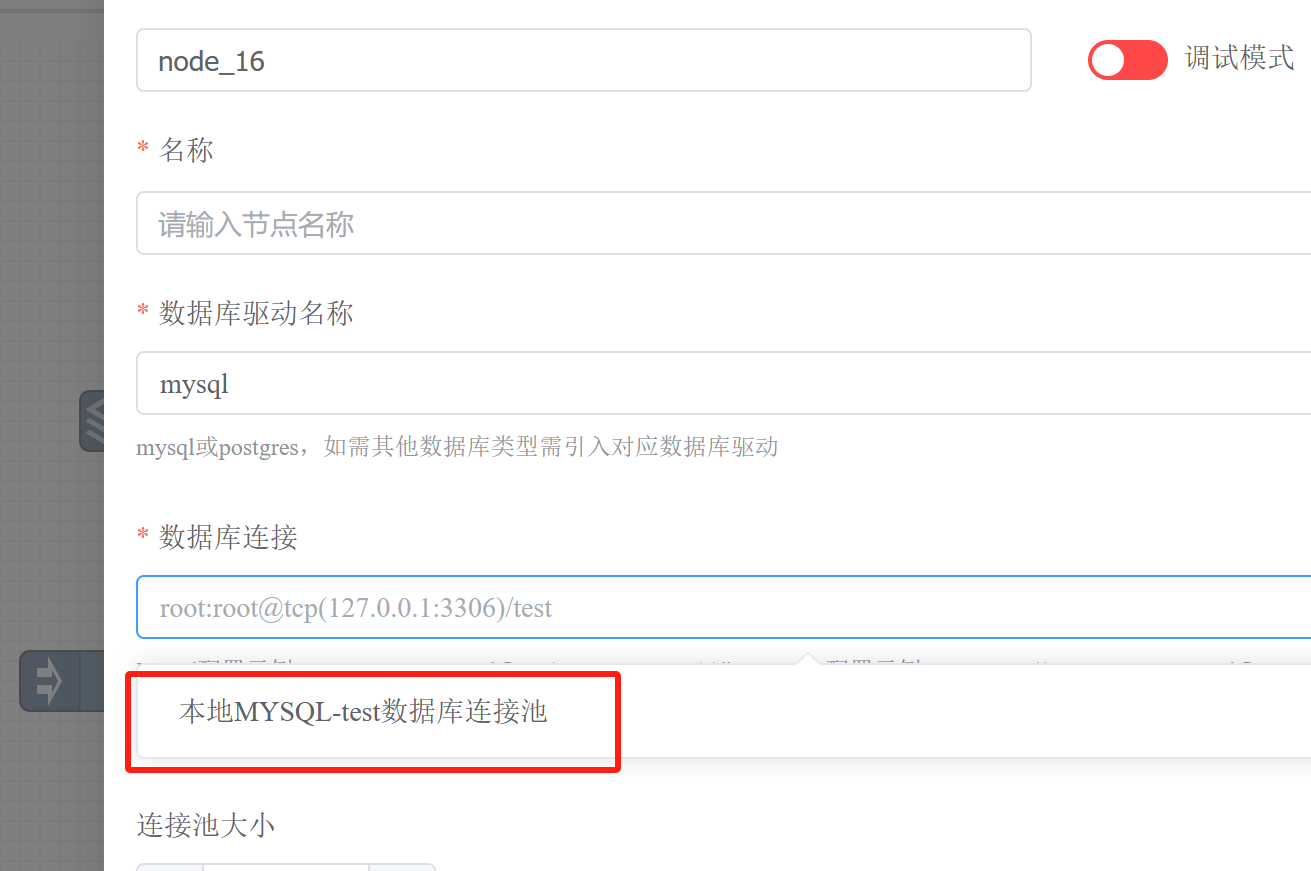
In the editor, the "Shared connection" dropdown of a connection field automatically lists reusable nodes within the same chain: by default it includes same-type nodes (e.g. multiple
mqttClientnodes are mutually selectable); once a component declaresrefNodes, it can also list cross-type nodes (e.g. an S7 Read node's dropdown can list S7 Write nodes), as well as same-chain endpoints (net/wsselectingendpoint/net/endpoint/ws).
# Custom Shared Resource Node Components
The framework encapsulates shared nodes: by embedding base.SharedNode[T] and calling two methods in Init, you can turn a custom component into a connection resource node reusable both chain-scoped and globally.
Below is a complete custom shared TCP client component example (wrapping one persistent connection to a fixed backend as the reusable resource T, depending only on the standard library): multiple x/tcpClient nodes in the same rule chain can reuse one TCP connection.
1. Define the resource type, configuration, and component (config fields use json tags, lowerCamelCase):
package mycomponents

import (
	"net"

	"github.com/rulego/rulego"
	"github.com/rulego/rulego/api/types"
	"github.com/rulego/rulego/components/base"
	"github.com/rulego/rulego/util/maps"
)

// tcpConn wraps a persistent connection to a fixed TCP backend (the reusable resource T)
type tcpConn struct {
	conn net.Conn
}

// TcpClientConfiguration node configuration
type TcpClientConfiguration struct {
	// Server owner fills the dial target host:port (e.g. 127.0.0.1:9000);
	//        borrower fills ref://<owner node ID>
	Server string `json:"server"`
}

// TcpClientNode reuses one connection to a fixed TCP backend
type TcpClientNode struct {
	base.SharedNode[*tcpConn]
	// Node configuration
	Config TcpClientConfiguration
}

func (x *TcpClientNode) New() types.Node {
	return &TcpClientNode{}
}

func (x *TcpClientNode) Type() string {
	return "x/tcpClient"
}
2
3
4
5
6
7
8
9
10
11
12
13
14
15
16
17
18
19
20
21
22
23
24
25
26
27
28
29
30
31
32
33
34
35
36
37
2. Register the connection factory in Init and enable chain-scoped reuse:
// Init initializes
func (x *TcpClientNode) Init(ruleConfig types.Config, configuration types.Configuration) error {
	if err := maps.Map2Struct(configuration, &x.Config); err != nil {
		return err
	}
	// InitWithClose: register the connection factory + close function (close is called when the owner is destroyed)
	_ = x.SharedNode.InitWithClose(ruleConfig, x.Type(), x.Config.Server, ruleConfig.NodeClientInitNow,
		func() (*tcpConn, error) {
			// owner actually dials: only the owner runs this factory; a borrower takes the borrow branch and never enters here
			c, err := net.Dial("tcp", x.Config.Server)
			if err != nil {
				return nil, err
			}
			return &tcpConn{conn: c}, nil
		},
		func(t *tcpConn) error {
			if t != nil {
				return t.conn.Close()
			}
			return nil
		})
	// BindChain: register the local connection under its node ID into the current chain's same-chain
	// resource registry so that in-chain ref:// borrowers can reuse it
	x.SharedNode.BindChain(configuration)
	return nil
}
2
3
4
5
6
7
8
9
10
11
12
13
14
15
16
17
18
19
20
21
22
23
24
25
26
3. Obtain the connection in OnMsg — both owner and borrower run the same code; the framework decides "create and register" vs "borrow from same-chain / NodePool" automatically based on whether server is a real address or a ref://:
// OnMsg handles messages
func (x *TcpClientNode) OnMsg(ctx types.RuleContext, msg types.RuleMsg) {
	// GetSafely: owner creates/reuses its own connection; borrower borrows from same-chain or NodePool
	c, err := x.SharedNode.GetSafely()
	if err != nil {
		ctx.TellFailure(msg, err)
		return
	}
	// write the message payload to the shared connection (see concurrency note below)
	if _, err := c.conn.Write([]byte(msg.Data)); err != nil {
		ctx.TellFailure(msg, err)
		return
	}
	ctx.TellSuccess(msg)
}

func (x *TcpClientNode) Destroy() {}
2
3
4
5
6
7
8
9
10
11
12
13
14
15
16
17
4. Register the component (see Custom Components Overview):
func init() {
	_ = rulego.Registry.Register(&TcpClientNode{})
}
2
3
5. Use it in a rule chain — one owner creates the connection, another borrower reuses it:
{
  "ruleChain": { "id": "r1", "name": "Custom shared component example" },
  "metadata": {
    "nodes": [
      {
        "id": "tcp_owner",
        "type": "x/tcpClient",
        "configuration": { "server": "127.0.0.1:9000" }
      },
      {
        "id": "tcp_send",
        "type": "x/tcpClient",
        "configuration": { "server": "ref://tcp_owner" }
      }
    ]
  }
}
2
3
4
5
6
7
8
9
10
11
12
13
14
15
16
17
Integration key points
- Use
InitWithClose(not the legacyInit) to register the connection factory and close function, so the connection is properly released when the owner is destroyed; obtain the connection viaGetSafely()inOnMsg(same-chain-first resolution — do not use the legacyGet()). BindChain(configuration)is required to enable chain-scoped connection reuse: without it the component can only be reused via the global NodePool and cannot beref://-referenced within a chain. BothInitWithCloseandBindChainare indispensable.- For components with their own reconnect logic, call
x.SharedNode.Refresh(newClient)after a successful reconnect: same-chain borrowers fetch the connection through the registry entry, and onlyRefreshupdates that entry, so borrowers get the reconnected client instead of the dead one. Tmust be the connection type itself (e.g.*tcpConnin this example, or*mqtt.Client); only same-type components canref://each other (mismatchedTfails the type assertion and returns an error).- When sharing a single connection, non-thread-safe operations on it (such as
conn.Writehere) must be serialized by the component itself with a lock, or use a client that is already concurrency-safe.
# Session Addressing Push: Reusing Server-side Device Connections
The previous sections cover reusing outbound client connections (e.g. multiple MQTT nodes sharing one dialed connection). ref:// also supports another kind of reuse: reusing the inbound device connections already established by a server-side endpoint to push to devices by target.
Applicable components: endpoint/net (TCP/UDP), endpoint/ws (WebSocket). These endpoints have a built-in session registry that registers a session when a device connects; a net/ws node configured with server=ref://<endpoint instance ID> can reuse these sessions to actively push data to specific devices by target (the identifier extracted via sessionKey, e.g. deviceId; * for broadcast), exact match.
Difference from client connection reuse:
- Client reuse: nodes share one outbound connection (node → remote server)
- Session addressing: nodes reuse an endpoint's inbound connection pool (device → endpoint), pushing back to already-connected devices
Workflow:
- A device connects to
endpoint/net/endpoint/ws; a session is registered using the identity extracted from the first frame viasessionKey(e.g.${msg.deviceId}) - The
net/wsnode is configured withserver=ref://<endpoint instance ID>andtarget=deviceId or * - The node resolves the endpoint following the ref:// resolution order from the same chain (or NodePool), looks up the target device's connection in its session pool, and reuses it to push
TIP
Session addressing push requires no polling or extra connections; the business side can deliver commands to online devices at any time. See net component, ws component.
# Difference between Shared Resource Node Components and Node Reference Nodes
- Node Reference Node fully references a specified node instance, including all configurations of the node.
- Shared Resource Node reuses the node's connection instance, but other configurations of the node are independent. For example, an MQTT client node: connection-class configurations such as the MQTT address and reconnection interval are shared, but other configurations in the node, such as the published topic, are independent for each node.